Send In-App Notifications from Cloud Flows in Power Platform
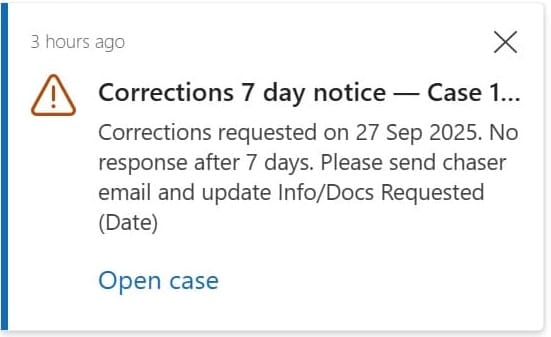
I recently started working on Power Platform and discovered there’s a built-in way to send in-app notifications to users. At first, I found plenty of examples showing how to send notifications from the front end using JavaScript, but not much on how to do it from a cloud flow.
(In hindsight, I probably just need to get better at scanning tech docs 😄).
I even tried inserting records directly into the underlying notification tables, but had no luck. So when I finally found a clean solution, I figured it was worth sharing — if it saved me time, it might save someone else’s too
🪛 STEP 1: Add the Action 🪛
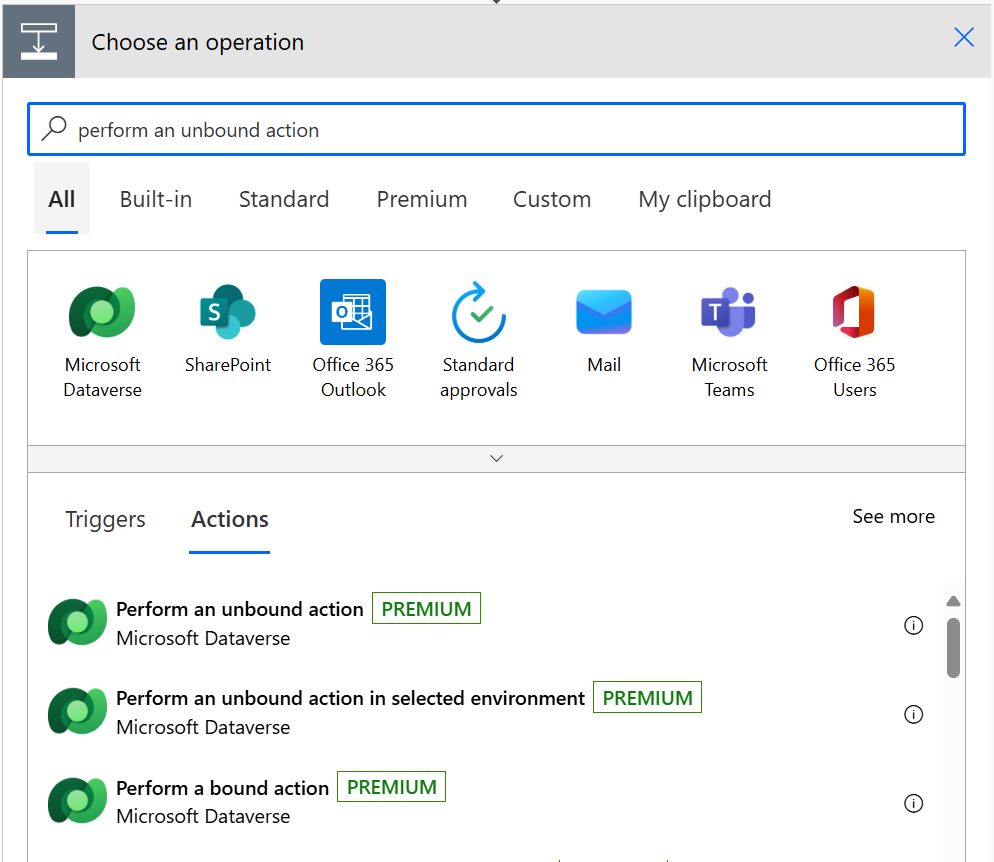
First job is to add an action to your cloud flow. Here search for and select Perform an unbound action
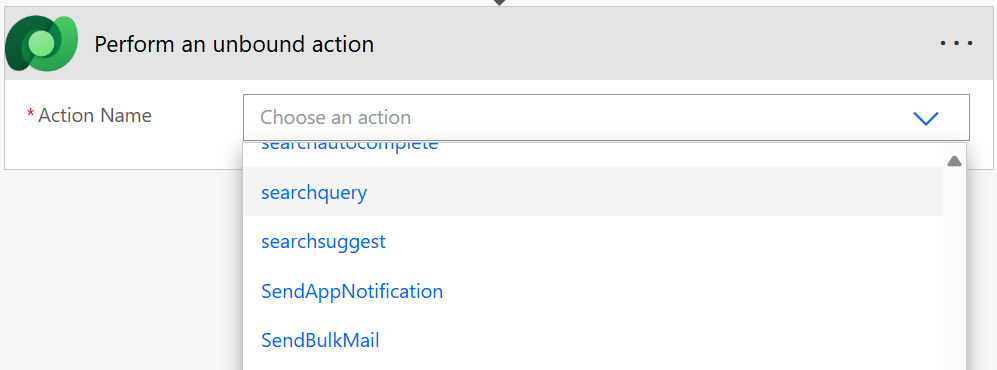
Use the Action Name dropdown of this action to select SendAppNotification
🪛 STEP 2: Configure the Action 🪛
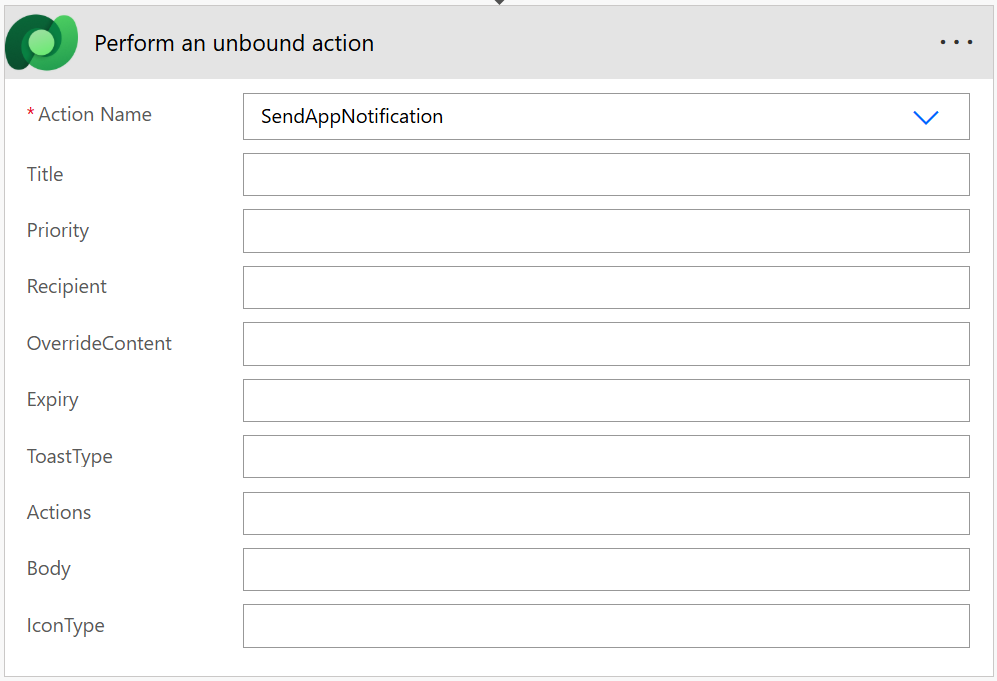
Now we have a blank action for sending a notification we can begin to enter all the relevant information that will be displayed to the recipient of the notification.
Title: What the user sees in bold at the top of the card.
Priority: How “important” the notification is in the list. Two choices: Normal or High.
Recipient: Who gets the notification. You can’t just drop a GUID or email here — it needs to be wrapped like this: /systemusers(<GUID>)
Override Content: Allows the use of markdown to adjust the style of the Title and Body properties.
Expiry: Auto-deletes the notification after this many seconds if not dismissed.
ToastType: How the toast behaves when created. Either Timed to appear for a short duration or Hidden to not show a popup and only appear in the notification center.
Actions: Buttons the user can click from the toast/card (more info below)
Body: Plain-text details that appear under the title.
IconType: The icon shown beside the notification. Options include Info, Success, Failure, Warning, Mention, Custom.
🪛 STEP 3: Add an Action Button (Optional) 🪛
As noted above, if you want the user to be able to open a record directly from the notification then customized JSON needs to be added to the Actions field. The easiest way to do this is to add a compose step prior to build the JSON required.
Here’s a minimal example JSON payload for an “Open customer record” action:
json(
  concat(
    '{',
      '"@odata.type":"#Microsoft.Dynamics.CRM.expando",',
      '"actions@odata.type":"#Collection(Microsoft.Dynamics.CRM.expando)",',
      '"actions":[{',
        '"title":"Open record",',
        '"data":{',
          '"@odata.type":"#Microsoft.Dynamics.CRM.expando",',
          '"type":"url",',
          '"url":"',
            variables('BaseUrl'),
            '/main.aspx?appid=',
            variables('AppId'),
            '&pagetype=entityrecord&etn=',
            /* REQUIRED: replace with your table logical name */
            '<your entity logical name>',
            '&id=',
            /* REQUIRED: replace with your GUID expression */
            replace(replace(<recordid field>,"{",""),"}",""),
          '",',
          /* inline (default) | dialog | newWindow */
          '"navigationTarget":"dialog"',
        '}',
      '}]',
    '}'
  )
)
📝 Notes
BaseUrlandAppIdshould be stored in Environment Variables so the flow works across environments without hard-coding.- Replace
<your entity logical name>with the table name, for example account - Replace
<recordid field>with whatever expression gives you the record’s GUID in your flow - The
replace(replace(...))function removes curly braces from GUIDs. Dataverse often returns {GUID}, but deep links require just GUID - navigationTarget options:
inline– opens in the same tab (default).dialog– opens in a pop-up dialog window.newWindow– opens in a new browser tab.
- Using the full URL ensures the record always opens in the correct app and avoids issues when users have access to multiple apps or environments
🧪 STEP 4: Test and Verify 🧪
When you trigger the flow, the recipient should see the notification in the Power Apps notification center.
If nothing shows:
- Double-check the recipient GUID (must be a valid user ID).
- Make sure the in-app notification feature is enabled in the target Model-Driven app.
- Check the flow run history for errors.
📚 References & Notes 📚
- 📄 Official docs: Send in-app notifications in model-driven apps
- 🧪 Tested on: Power Platform Cloud Flows — October 2025
💬 If you adapt this for a different entity or scenario, the pattern is exactly the same — just update the logical name and record ID.
And with a bit of luck, this should still work.😉
